Document Search Cheatsheet
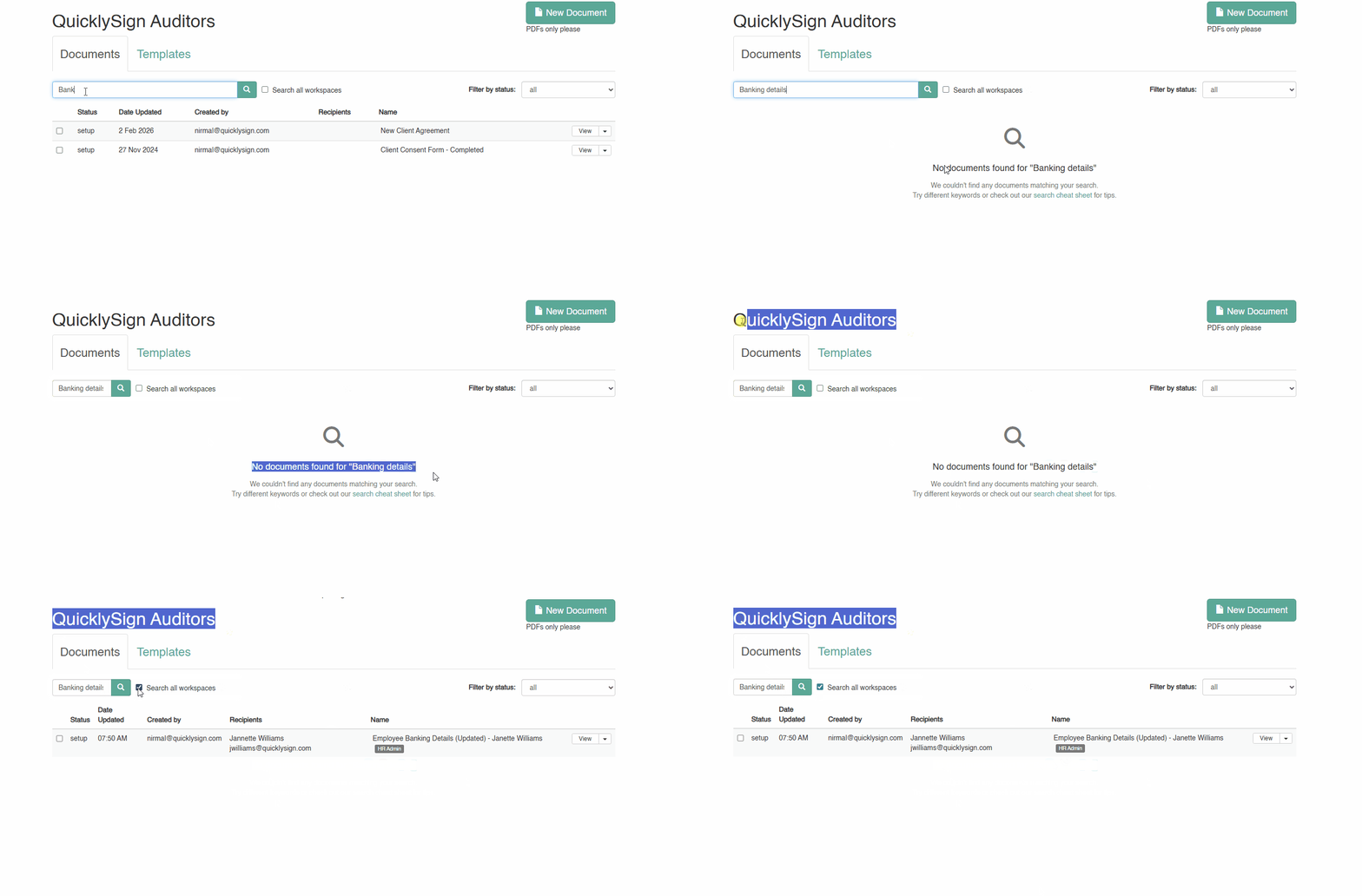
Search across workspaces
Quickly find the documents you need without switching workspaces.
If you belong to multiple workspaces you are now able to search across all workspaces you belong to. This streamlines the search process by allowing you to find documents urgently.
How to use "Search across workspaces":
Quick reference for searching documents in QuicklySign.
Basic Search
| Example |
Description |
agreement |
Search all fields for "agreement" |
sales report |
Search for documents containing "sales" AND "report" |
"exact phrase" |
Search for exact phrase (use quotes) |
Field-Specific Search
Target specific fields using field:value or field: value (space after colon is OK).
Document Name
| Prefix |
Example |
Description |
name: |
name:agreement |
Search document names |
doc: |
doc:contract |
Search document names |
document: |
document:NDA |
Search document names |
agreement: |
agreement:sales |
Search document names |
Signatories
| Prefix |
Example |
Description |
signer: |
signer:emma |
Search signatory names/emails |
signatory: |
signatory:john |
Search signatory names/emails |
signer:"John Smith" |
Exact name match |
Use quotes for phrases |
Email Addresses
| Prefix |
Example |
Description |
email: |
email:@gmail.com |
Search all email fields |
cc: |
cc:manager |
Search CC recipient names/emails |
creator: |
creator:admin@ |
Search document creator email |
Document Content
| Prefix |
Example |
Description |
content: |
content:confidential |
Search PDF text and data fields |
text: |
text:signature |
Search PDF extracted text only |
data: |
data:address |
Search data field values only |
Note: Partial matches on words within the PDF content aren't supported for document text. If the word "QuicklySign" existed in the PDF content, a search for "quicklysign" would return a result but a search for "quickly" would not.
Files
| Prefix |
Example |
Description |
file: |
file:contract.pdf |
Search filenames |
filename: |
filename:invoice |
Search filenames |
Status Filter
Filter by document status using status:value .
| Filter |
Matches Status |
status:setup |
Setup/Draft |
status:draft |
Setup/Draft |
status:new |
Setup/Draft |
status:pending |
Awaiting Signatures |
status:awaiting |
Awaiting Signatures |
status:sent |
Awaiting Signatures |
status:complete |
Complete/Signed |
status:signed |
Complete/Signed |
status:done |
Complete/Signed |
status:rejected |
Rejected/Declined |
status:declined |
Rejected/Declined |
Combining Searches
You can combine multiple field searches and filters:
| Example |
Description |
status:complete signer:emma |
Complete docs with signer "emma" |
type:template name:NDA |
Templates with "NDA" in name |
signer:john email:@company.com |
Docs with signer "john" AND email containing "@company.com" |
status:pending agreement |
Pending docs containing "agreement" anywhere |
Exact Phrase Matching
Use quotes for exact phrases:
| Example |
Description |
"sales agreement" |
Exact phrase in any field |
name:"Sales Agreement" |
Exact phrase in document name |
signer:"John Smith" |
Exact signatory name |
Date Range Filters
Filter by document dates using comparison operators.
Date Fields
| Field |
Shorthand |
Description |
date_created |
created |
When document was created |
date_updated |
updated |
When document was last updated |
date_completed |
completed |
When document was completed |
Operators
| Operator |
Meaning |
Example |
> |
After |
date_created>2024-01-01 |
>= |
On or after |
created>=2024-01-01 |
< |
Before |
date_updated<2024-06-15 |
<= |
On or before |
updated<=2024-12-31 |
= |
On (that day) |
completed=2024-03-15 |
| Format |
Example |
Matches |
YYYY-MM-DD |
2024-01-15 |
That specific day |
YYYY-MM |
2024-01 |
Entire month |
YYYY |
2024 |
Entire year |
Date Range Examples
| Query |
Description |
created>2024-01-01 |
Created after Jan 1, 2024 |
created>=2024-01-01 created<2024-07-01 |
Created in first half of 2024 |
updated>=2024 |
Updated in 2024 or later |
completed=2024-03-15 |
Completed on March 15, 2024 |
Deleted Documents
By default, deleted documents are hidden from search results. Add is_deleted to show only deleted documents.
| Filter |
Matches |
is_deleted |
Show only deleted documents |
| (no filter) |
Only non-deleted documents (default) |
Search Ordering
By default, the search order is by relevance of a keyword and then by date updated.
Tips
- Case insensitive:
SIGNER:Emma = signer:emma
- Space after colon OK:
signer: emma = signer:emma
- Multiple filters use AND:
status:complete signer:bob finds docs that are complete AND have signer bob
- Quotes for phrases: Use
"..." when searching for multiple words together
- Partial matching:
signer:em will find "Emma", "Emily", etc.
Quick Examples
# Find all complete documents
status:complete

# Find documents where Emma is a signer
signer:emma

# Find pending NDAs
status:pending name:NDA

# Find templates created by specific user
type:template creator:admin@company.com

# Find documents with specific text in PDF
content:"confidential information"

# Find documents by CC recipient
cc:legal@company.com